

SendWILL (formerly EcomSend, now listed as CWILL Popup Email Marketing on the App Store) is a Shopify app that bundles email capture popups, a spin wheel and automated emails for welcome and abandoned cart. It is built for a small store with traffic but almost no subscribers. Our verdict: a good pick from the Essential plan, around $12 a month, but neither a free app nor a reason to leave Klaviyo or Omnisend if your flows already run.
7.5/10
Our verdict
A good pick from the Essential plan, around $12 a month, for a store with traffic and few subscribers. Not a free app, and not a reason to leave Klaviyo or Omnisend.
- Features8
- Ease of use8
- Pricing and transparency6
- Merchant feedback8
What we like
- Popups, spin wheel and 5 automated emails in one app
- A unique discount code per subscriber, targeting by page, device and country
- 4.9/5 from more than 7,600 App Store reviews
Watch out for
- Free plan cut to 30 new subscribers a month, with no automation, since August 20, 2026
- Usage billing over the quota, popups paused at the spending cap
- Trial approved upfront, and no refund
This article contains affiliate links: if you install SendWILL through our link, CWILL pays us a commission at no extra cost to you.
Promo code SendWILL
40% off the first month of paid monthly plans, confirmed in writing by CWILL. The app has no code field: install it through our link, and quote CLICKROAD to support if the discount does not show.
Claim the offer
Is SendWILL worth it?
SendWILL is worth its price for a store that captures fewer than 150 new subscribers a month and wants a discount popup followed by automated emails, without paying for Klaviyo. We installed it on a Shopify test store on a Pro trial: a popup built from a template, the spin wheel, the theme integration and the automations list. We did not send any campaign or automated email: on sending, our verdict rests on CWILL’s documentation and merchant reviews.
On the App Store, SendWILL shows 4.9 out of 5 from more than 7,600 reviews. The tone changed after August 20, 2026, when the free plan was cut: 6 of the 70 reviews posted since give 1 star, while fewer than 2% of earlier reviews went below 4 stars.
Who it is for: a Shopify store with traffic and almost no subscribers that wants a discount popup followed by welcome and abandoned cart emails, starting on the Essential plan.
Who it is not for: a store that already runs Klaviyo or Omnisend flows, or one that captures hundreds of subscribers a month and was looking for a free app.
What does SendWILL do?
SendWILL does three things: email capture popups, a spin wheel and automated emails, on top of regular campaigns.
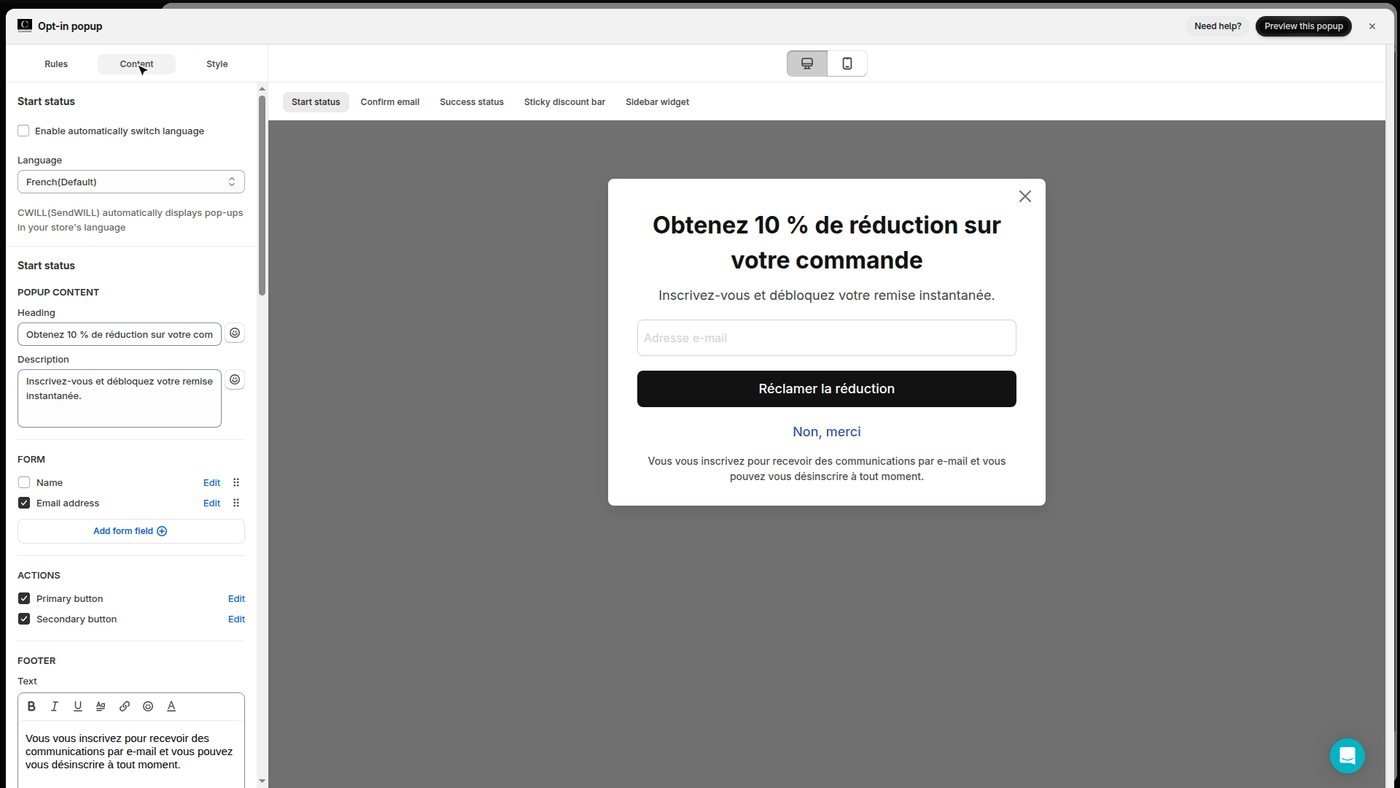
A signup popup with a discount code
A SendWILL popup is built from a template, with a unique 10% coupon per subscriber generated by default. It shows on a timer, on scroll, on exit intent or from a link, and can be targeted by page, device, country, frequency and date. The publish switch is on by default: check it before you enable the theme integration.
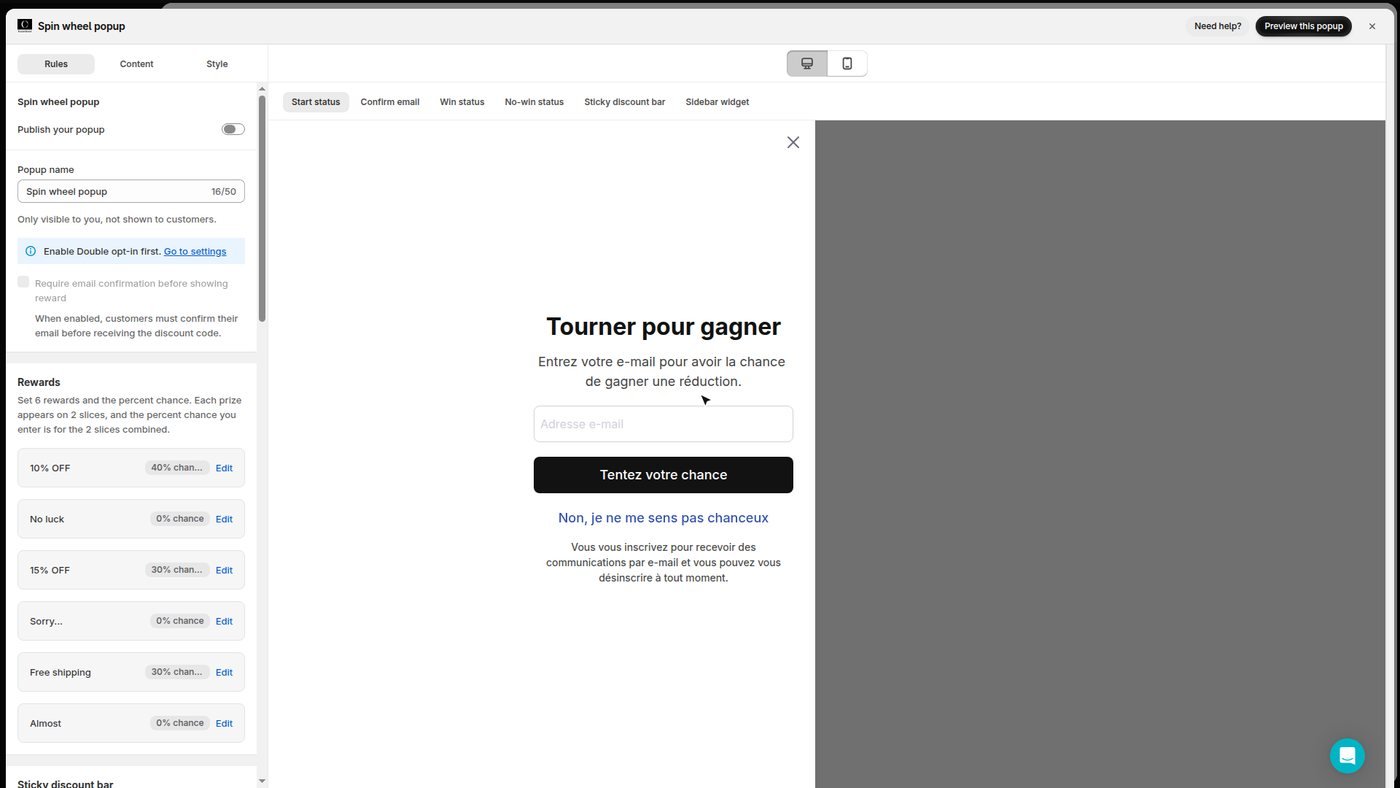
A spin wheel
The SendWILL spin wheel offers 6 rewards, each with its own adjustable win chance. Visitors enter their email address to spin and leave with the discount they won.
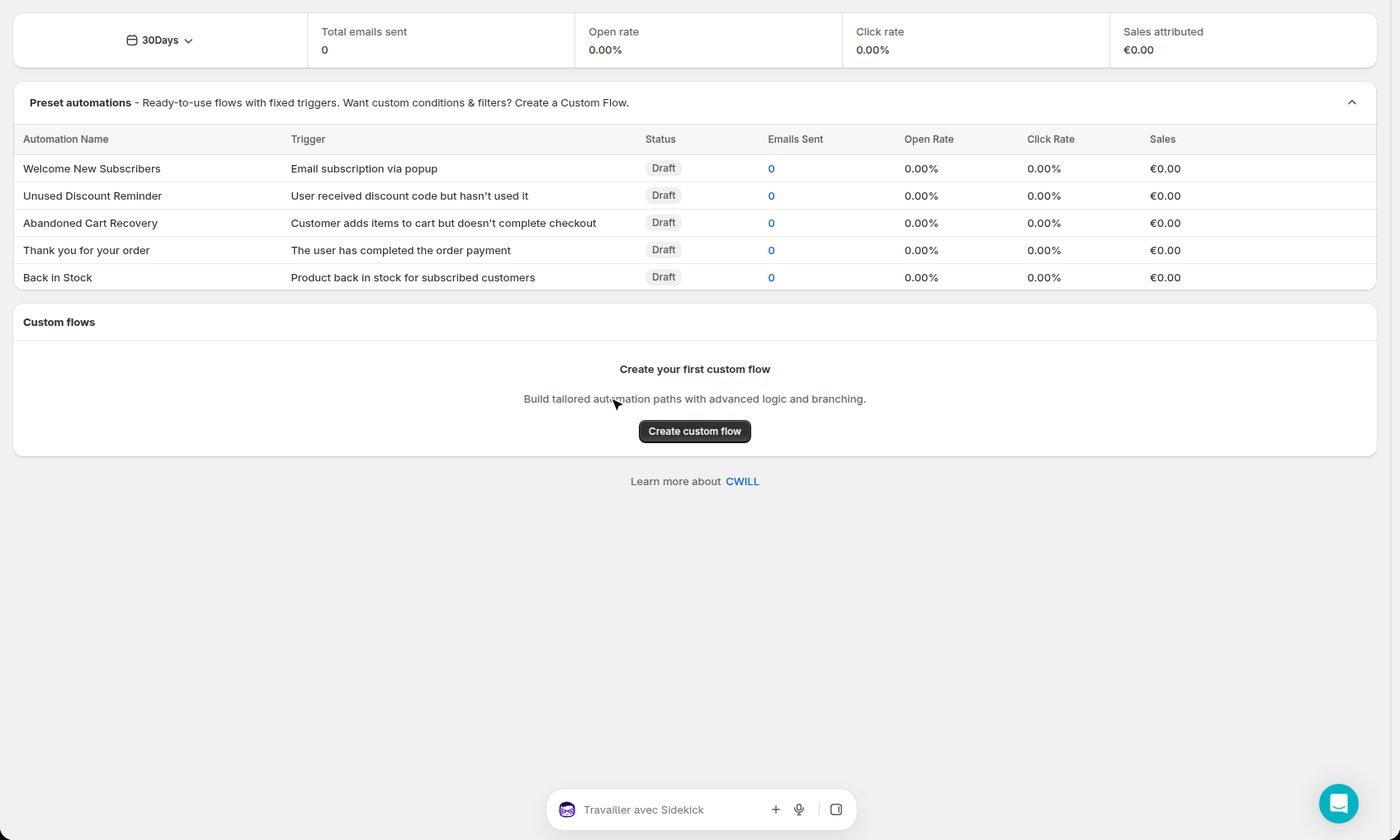
Five automated emails ready to switch on
SendWILL ships 5 preset automations: welcome, unused discount reminder, abandoned cart, thank you for your order and back in stock. They arrive as drafts, none is active after install, and they need at least the Essential plan. Custom flows and multilingual templates start on Pro.
The popup on your store
The SendWILL popup shows on the storefront once the app embed is enabled in the theme. We saw it on the preview of an unpublished theme, without touching the live theme. Its text follows the store language, not the admin language.
How much does SendWILL cost?
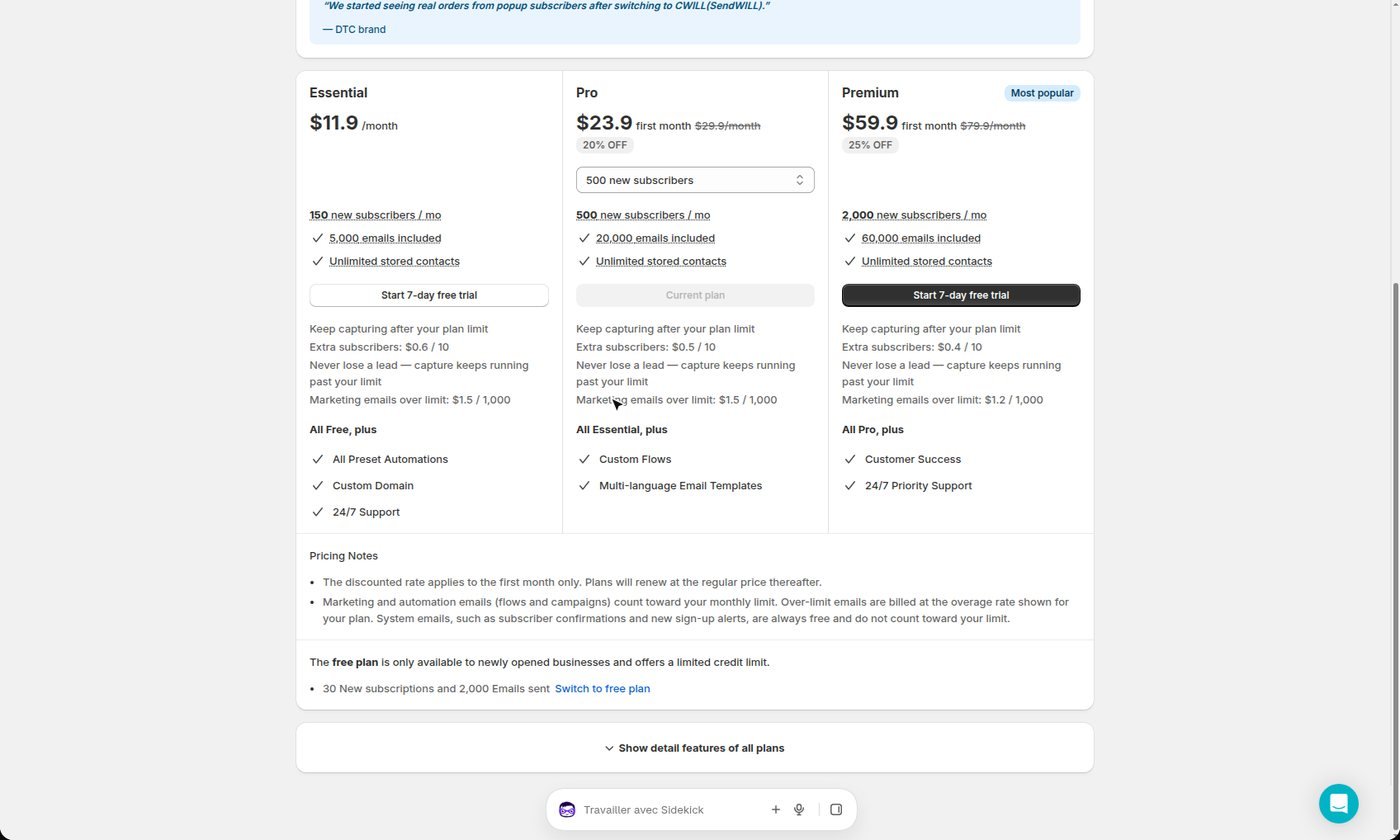
SendWILL runs from free to about $80 a month depending on how many new subscribers you capture each month, with no annual pricing and a 7-day trial on paid plans. Here are the four plans as listed on the App Store and in the app on October 27, 2026:
| Plan | Price per month | New subscribers per month | Emails per month | Over the limit |
|---|---|---|---|---|
| Free | $0 | 30 | 2,000 | capture stops |
| Essential | $11.90 | 150 | 5,000 | $0.60 per 10 subscribers, $1.50 per 1,000 emails |
| Pro | $29.90 | 500 | 20,000 | $0.50 per 10 subscribers, $1.50 per 1,000 emails |
| Premium | $79.90 | 2,000 | 60,000 | $0.40 per 10 subscribers, $1.20 per 1,000 emails |
Three rules change the bill:
- The Free plan has no automation and is described as reserved for “newly opened businesses”: a store that really collects emails moves to Essential.
- Over the plan limit, every extra subscriber and every thousand emails cost more, and once the spending cap is reached, popups are paused until the next month.
- The 7-day trial approves the subscription upfront, with a usage cap of $1,000 per 30 days on Pro: cancel before day seven to pay nothing, as CWILL’s terms allow no refund.
Promo code SendWILL
40% off the first month of paid monthly plans, confirmed in writing by CWILL. The app has no code field: install it through our link, and quote CLICKROAD to support if the discount does not show.
Claim the offer
What are SendWILL’s limits?
SendWILL’s limits come from the free plan cut in August 2026, usage-based billing and a few default settings to watch:
- Since August 20, 2026, the free plan counts 30 new subscribers a month and sends no automated email. Of 45 reviews at 1, 2 or 3 stars, 9 come from former free users pushed to a paid plan.
- Without a paid Shopify plan, only test emails go out, according to CWILL’s FAQ.
- Double opt-in is off by default: turn it on if you want proof of consent for every subscriber.
- Of those 45 negative reviews, 9 report a popup that does not show, and 3 a popup or discounts still active after uninstalling.
- The app was renamed twice (EcomSend, SendWILL, then CWILL Popup Email Marketing): search for “CWILL” on the App Store.
What are the alternatives to SendWILL?
The two serious alternatives to SendWILL are Klaviyo and Omnisend, both deeper on email marketing:
- Klaviyo: the email marketing standard on Shopify, for a store that wants fine segmentation and per-flow reporting.
- Omnisend: email, SMS and popups in one app, with a public offer of 30% off the first 3 months of the Standard and Pro plans paid upfront.
As a complement, SendWILL does no SEO. SEO Alpin, the app we publish, brings the traffic that SendWILL turns into subscribers: blog articles, backlinks and technical SEO for your store, with a free plan. This link is not an affiliate link.
SendWILL FAQ
Is there a SendWILL promo code?
Yes: the code CLICKROAD gives 40% off the first month of SendWILL’s paid monthly plans, confirmed in writing by CWILL. The app has no code field: install it through our link and quote the code to support if the discount does not show.
Is SendWILL free?
SendWILL’s Free plan has no time limit, but it caps you at 30 new subscribers and 2,000 emails a month, with no automation. CWILL describes it as reserved for newly opened businesses, and automated emails start on the Essential plan.
Are EcomSend, SendWILL and CWILL the same app?
Yes: EcomSend, launched in 2022, became SendWILL in January 2026, then CWILL Popup Email Marketing on the App Store the same year. The publisher is CWILL INC (Channelwill), and the listing still lives at apps.shopify.com/ecomsend.
What happens over the subscriber quota?
Over its plan quota, SendWILL bills every 10 extra new subscribers (under $1) and every extra thousand emails ($1 to $2). Once the spending cap is reached, popups are paused until the next billing cycle.
Can you try SendWILL for free?
Yes, with a 7-day trial on the Essential, Pro and Premium plans, but the subscription is approved upfront in Shopify: cancel before day seven to pay nothing, as CWILL does not refund. The Free plan stays available without a trial.